EQ Swap
One change from the last tutorial: this fusor modulates the EQ as well as the channel faders. On screen that second domain's card reads 3-Band EQ.
Four runs, all by hand. The first introduces the second domain. The second runs back the other way, and you take over one of the faders mid-transition. The third sets what happens to the EQ at the end of the run, and the fourth starts from the state the third left behind.
Before you start
- Channel Fader done, so the player window, the fusor picker, Session View, Manual Run Mode and the mix mark are familiar.
- Tutorials still the active collection.
- Your crossfader still in bypass, where you put it in Channel Fader. It stays there for the rest of the tutorials.
- Soft takeover enabled in your DJ application on the controls the Fusor player modulates. Without it a control jumps to the application's own value the moment you touch it, which makes run two's gesture hard to read. See Traktor Pro Setup.
Run one: A second domain
1. Load EQ Swap
Click the fusor picker and click the EQ Swap row.
Open Session View with the expand arrow. The stack now holds two cards rather than one:
| Card | What it modulates |
|---|---|
| 3-Band EQ | low, mid and high on each deck. The outgoing track loses its highs, then its mids, then its bass, while the incoming track gets its bass back first, then its mids, then its highs. |
| Channel Fader | volume on each deck. A matched pair of fade curves, with the same 1 / 2 switch as in Channel Fader. |
Click the 3-Band EQ card to expand it. Under each side are the three bands, and all six are written in blue and underlined, because the fusor modulates all six. Hover one to see its curve.
Now click the Channel Fader card. The 3-Band EQ card closes as the Channel Fader card opens: one card is open at a time.
2. Two domains, in signal-flow order
Session View orders domain cards by signal flow, the order the audio passes through them in your mixer. The EQ comes before the channel fader, so the 3-Band EQ card sits first and the Channel Fader card last. Each domain keeps its own card, with its own enable switch and its own End of run setting.
The Channel Fader switch ships on 1, constant power, and this tutorial uses 1.
The crossfader setups, and what each one does to a running fusor, are in Crossfader Setup and Deck-Level Modulation.
3. Prepare your decks
In your DJ application, on the deck pair you chose during setup:
- Load two tracks that will mix well with a Middle mix point: the outgoing track on deck A and the incoming track on deck B. This run mixes from deck A to deck B. The incoming track comes in over the first half of the transition and the outgoing track goes out over the second half. The pair you ran in Channel Fader will do. Cue the incoming track at the point where you want it to start.
- Set your channel faders. The outgoing deck's at full and the incoming deck's at zero.
That is where the fusor's two
volumecurves begin. - Set the crossfader. It is in bypass, so it modulates nothing you can hear, but it is still the progress actuator: in Manual Run Mode it is how you move the transition. Leave it hard over to the outgoing side.
- Set the EQ knobs on both decks to neutral.
- Beatmatch the incoming track to the outgoing track, by hand or with your DJ app's sync.
- Start the outgoing deck playing.
The Run Mode switch is still on Manual, where you left it.
4. Run it
Click the arm control, start the incoming deck so its mix-in point meets the outgoing track's mix-out point on the transition's Middle mix point, and move the crossfader across.
If you are unsure what we mean by starting the incoming deck so the mix-in and mix-out points meet on the mix point, see Starting a Transition for examples.
The two channel faders move as they did in Channel Fader: the outgoing fader comes down along its curve and the incoming fader goes up along its mirror. This time the six EQ knobs move with them, band by band. You hear none of the crossfader's own travel, because it is in bypass.
The orange mix mark sits at the center of the progress meter. EQ Swap is a Middle because both of its domains are centered on halfway: the outgoing deck's EQ bands hold at unity until between 31% and 46% of the run, the incoming deck's reach unity between 54% and 69%, and on the constant-power pair the two faders are at equal level at 50%. Bring progress to the mix mark as your incoming track reaches the point where attention should shift to it, as in Channel Fader.
Take it to the end and stop the outgoing deck.
5. What the end of the run puts back
Look at your mixer now that the run has completed.
The outgoing deck's three EQ bands are back where they sat when you armed. The 3-Band EQ domain ships on Restore, which sends the controls it drove back to where they were before the run.
The two channel faders have not moved. The Channel Fader domain ships on Leave: nothing is sent, and both faders stay where the run left them, the outgoing one at the bottom of its curve and the incoming one at the top.
End-of-run reset acts on the outgoing deck. The incoming track is the one still playing, so the fusor's incoming side is left exactly where the run left it.
The three choices, and which domain ships on which, are in Domains → End of run. You set one yourself in run three.
Run two: Taking a control back
6. Set up for the other direction
The roles swapped when run one completed, and the faders are already where this run needs them: the new outgoing deck's fader is at full, and the new incoming deck's is at zero. Your crossfader is on the new outgoing side.
Cue a track on the incoming deck, set its EQ knobs to neutral, and click the arm control.
7. Run it, and take the incoming fader
Start the incoming deck from the same point as in step 4, and move the crossfader to about a third of the way across. Stop there. Progress holds, and so does every control.
Now take hold of the incoming deck's channel fader on your controller and push it slowly up toward where the fusor has it.
As soon as your hand moves, the chase bar covers the picker row. On the left it names the
control, Deck A · Volume on an A/B pair, with an arrow and the direction to move it: Turn up.
On the right, the Fusor player's value is a line and your fader's position is a white dot.
When the dot reaches the line, the lane turns green and reads Yours. That moment is the
pickup. The green lane holds for a second and a half, then
fades.
Three things change at pickup:
- That fader stops being modulated. It stays wherever your hand puts it for the rest of the run. Push it further up and the incoming track arrives early; pull it back down and the track stays out.
- The status line reads
CTL6-Manual takeover: a.volumein orange. The address is shortened to its last two segments, which for a channel fader is the deck and the control. The letter is whichever deck holds the incoming role on your pair, so a Deck C/D layout readsc.volumeord.volume. - Everything else keeps running. Move the crossfader on, and the outgoing fader continues down its curve and the six EQ knobs continue along theirs.
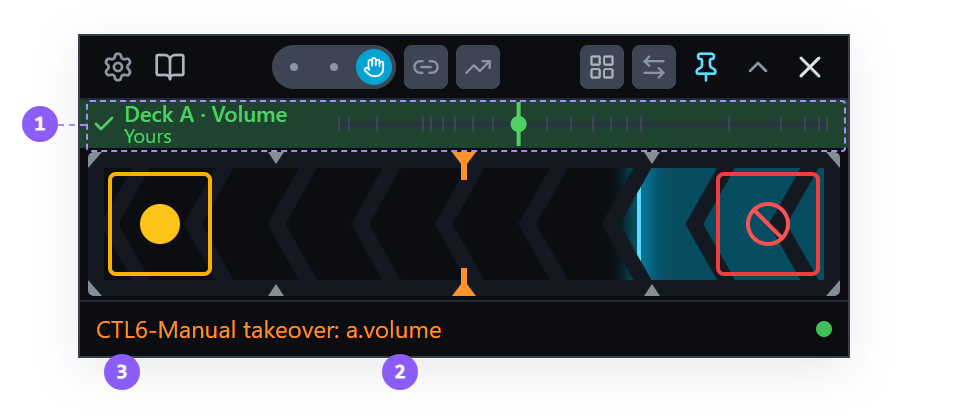
- Chase bar: names the control,
Deck A · Volume, and readsYoursin green at the pickup. - The released control:
a.volume, the incoming deck's channel fader. - CTL6: the code for a manual takeover, in Status Messages.
Take the crossfader to the end, bringing the incoming fader up to full yourself as you go, and stop the outgoing deck.
8. What counts as taking a control
When the Fusor player receives your DJ controller's MIDI, it releases a control at pickup. The channel faders are among the controls Setup's DJ controller walk learns, so the Fusor player receives your controller's MIDI for them directly. On a mapped control the player keeps modulating until your hand reaches its value, or passes through it, and releases the control at that moment. It works just like soft takeover in your DJ application. A bump that never travels as far as the player's value takes nothing over. The chase bar appears only on a mapped control.
Without that mapping, takeover is less precise. While the Fusor player modulates a control it sends it a new value many times a second, and your DJ application echoes each one back. That echo is how the player keeps track of where every control is. When your hand moves the same control, its values arrive in the same stream as the echoes, and the player has to distinguish them. Mapping your controller lets the player receive that control's MIDI directly, so it detects the exact moment of pickup. On a control without that mapping, it detects your movement in the stream instead: a value that is not an echo of what it sent releases the control. The player reads the stream this way on mapped controls too.
If your controller sends MIDI, map it. Receiving your controller's MIDI directly is the most accurate way for the Fusor player to detect a takeover, so map it in Settings → Mapping → DJ controller. See Hardware Controller → DJ controller.
Either way the release is the same: CTL6, and nothing more is sent to that control.
A control you have taken over stays taken over for the whole transition. The fusor does not modulate it again within that run.
A control you take on the outgoing deck still follows its domain's End of run setting. The gesture does not change that setting. Had you taken one of the outgoing deck's EQ knobs instead, it would have gone back at the end with the other two.
Run three: Parameter disposition at end
This run mixes from deck A to deck B again. Deck A is outgoing and still playing, with its channel fader at full, deck B's fader is at zero, and the crossfader is on deck A's side, where run two left it.
9. Set End of run to Leave
Open Session View and find the End of run dropdown in the 3-Band EQ card's title row. It is on Restore. Open it and choose Leave.
End of run has three values:
| Value | What happens at the end of the run |
|---|---|
| Leave | The outgoing controls stay where the transition left them. |
| Restore | They go back where you had them before you armed. |
| Home | They go to the control's neutral position: an EQ band centers, an FX unit closes. |
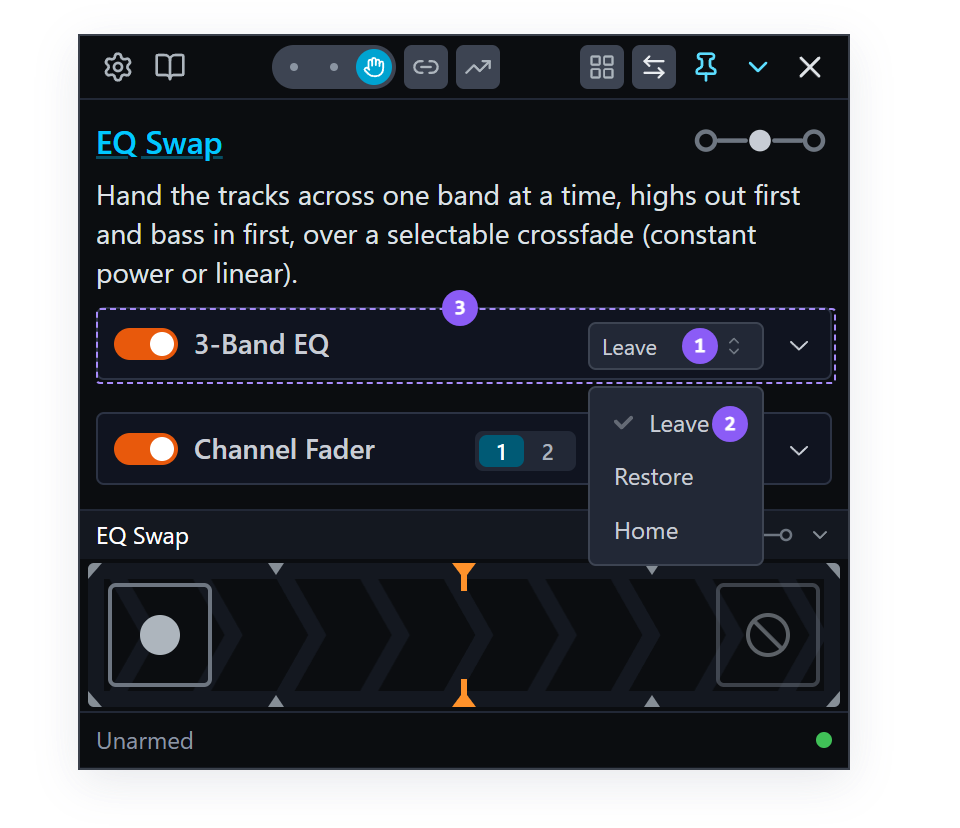
- End of run: the dropdown you just changed.
- The current setting: the tick marks which of the three is in force.
- The card it belongs to: this setting is per domain, so each set of parameters can end differently.
The Channel Fader card shows the word Leave rather than a dropdown. Channel Fader offers only Leave.
That dropdown is a session edit, like the 1 / 2 switch: it changes the loaded fusor, it is saved, and it takes effect immediately. Session edits let you adjust how the fusor will run, and let you match a fusor's authored parameters to your current setup without re-authoring the fusor. See Loading a fusor → What session edits cover and, for the three dispositions in full, Domains → End of run.
Close Session View.
10. Run it
- Load a new incoming track on deck B, cue it at the point where you want it to start, and beatmatch it to deck A.
- Set the EQ knobs on both decks to neutral.
- Click the arm control, start deck B so its mix-in point meets deck A's mix-out point, and move the crossfader across to deck B's side.
Take it to the end and stop the outgoing deck.
11. What Leave left behind
Look at the six EQ knobs.
The outgoing deck's three are still cut, and the incoming deck's three are still up around center. Each is where its curve left it. That is the EQ domain's Leave setting working. The channel faders are where they were after run one: the outgoing one at zero, the incoming one at full.
End of run acts on the outgoing deck, whichever of the three values is set. The incoming deck's are always left where the run put them, because that deck is the one still playing and it becomes the next transition's outgoing side.
Do not tidy up. Leave the knobs exactly where they are and leave both decks alone. Run four is built out of this state and needs it.
Run four: Session edits are written to the file, and ERA
Both of this run's lessons are made out of what run three left behind.
The roles swapped when run three completed, so deck B is now the outgoing deck. This run goes the same way as run three, from deck A to deck B, so deck A, the deck whose EQ Leave left cut, has to be outgoing again. Swap Roles does that in one click.
-
Stop deck B and load a fresh track on it.
-
Click Swap Roles in the toolbar: the two arrows pointing in opposite directions, beside the Pad Mode grid. Deck A is outgoing again, and the chevrons in the progress meter point from deck A to deck B.
The swap also sets your mixer up for the run: deck A's channel fader goes to full, deck B's to zero, and the crossfader goes hard over to deck A's side. That is where EQ Swap's two
volumecurves begin. Set channel faders when swapping roles and Reset crossfader when swapping roles in Settings → General do that, and both ship on. They leave everything alone if the deck becoming incoming is still playing with its fader up, which is why deck B is stopped first. See Manual Role Swap. -
Cue deck A back and start it playing.
12. Reload EQ Swap
Click the fusor picker and click the EQ Swap row again.
The EQ knobs are still cut. Loading a fusor sends nothing, so a reload does not touch your rig any more than the first load did.
The End of run dropdown is still on Leave. Open Session View and see it. Changes made in Session View are written to the fusor file, so the copy of EQ Swap in your library now ends differently from the one that shipped.
Set the dropdown back to Restore before you move on, so later tutorials load the fusor these pages describe.
13. Run it as it stands
ERA, or Encounter Rate Adaptation, is what the Fusor player does when a control is not at its curve's value at the start of a run.
ERA is similar to soft takeover, where a control holds until the incoming value reaches it, so nothing jumps. ERA brings each control from its current value onto the fusor's authored curve. See Settings → ERA.
Arm with the knobs exactly as run three left them, start deck B, and move the crossfader across.
Watch the outgoing deck's three bands. They come back up, turn over before they reach center, and settle onto the falling curve around the middle of the run. From there they are the authored curve: the same values at the same positions, arriving at cut when the transition ends.
at the EQ Swap walk — ERA's travel onto the curve in a Manual run, paced by the crossfader rather than the clock.
ERA posts no status-line message.
Here is why they moved that way. The outgoing bands were sitting on the value their curves end on, because run three's Leave put them there. The Fusor player brings the control onto the authored curve: the control travels toward the curve, touches it without crossing it, and from that moment follows the curve as authored. What you give up is the opening of the author's sweep, which is picked up from the meeting point rather than from the top.
Take it to the end and press END.
Watch where the outgoing knobs go. The dropdown is back on Restore, so they go back to where they were when you armed, which is cut. Restore restores to the arm-time snapshot. It is the only one of the three that needs a baseline, and the baseline is taken at arm. The value that sends a control to its neutral position is Home.
The status line counts what it sent:
Controls restore sent (3)
Three, not six, for the reason step 11 gave: the disposition acts on the outgoing deck. The Channel Fader domain is on Leave, so it sends nothing.
14. Turn one band partway up, and run it again
The roles swapped again when that run completed. Set up as before run four: stop deck B and cue it back, click Swap Roles, and cue deck A back and start it playing.
Turn deck A's low knob up to roughly halfway between where it is now and center. Leave the other five alone.
Arm, start deck B, and move the crossfader across again.
That band now sits on a value the falling curve is going to reach halfway through the run, so it waits. The control holds exactly where you put it, the curve comes down to meet it, and from there it follows the curve the rest of the way.
The other two outgoing bands are still on their end values, so they travel onto the curve the way they did in step 13.
Press END at the completion wait.
Waiting and traveling are two cases of the same ERA rule. Where a control meets the curve, how fast it may travel to get there, and when it stands still instead are in Settings → ERA.
Now you can tidy up: set both decks' EQ knobs back to center.
What you learned
- That a fusor can have more than one domain, and that Session View lists them in signal-flow order with one card each, one card open at a time.
- That each domain keeps its own enable switch and its own End of run setting.
- That moving a control the fusor is modulating releases that one control for the rest of the run and
reports it as
CTL6, and that the fusor does not modulate it again within that run. - That on a control learned on your DJ controller the chase bar shows your fader approaching
the player's value, and that the control is released at pickup, when your hand reaches that
value, with the lane reading
Yours. - That without a mapped controller the player reads your hand from your DJ application's echoes, and that a value which is not an echo releases the control, less precisely than pickup.
- That a released control on the outgoing deck still follows its domain's End of run choice.
- That End of run is a session edit with three values, that Leave holds the controls where the run put them, that all three act on the outgoing deck, and that Channel Fader offers only Leave while 3-Band EQ ships on Restore.
- That a session edit is written to the fusor file, so reloading the fusor gets you the edited version.
- That ERA is how a run starts from wherever your knobs actually are: the control travels onto the authored curve without crossing it, or holds until the curve reaches it, and neither is reported on the status line.
- That Restore puts controls back to where they were at arm, which is not the same as neutral.
Where to next
- Auto Run Mode: EQ Swap on the clock, with Abort, pausing, a domain switched off so you manipulate the channel faders yourself, and the tempo ramp.
- Crossfader Setup and Deck-Level Modulation: the three arrangements, and the authoring pattern that lets one fusor work across all of them.
- Status Messages → CTL6: the code this tutorial produced, and what it does to the rest of the run.
- Domains → End of run: the three choices, and which domain ships on which.
- Settings → Guards: every guard that can act on a run, with its default and what changing it does, including the two ERA cases this page did not produce.