Actions and Pad Mode
An action is a short list of control changes that runs when you fire it, outside a curve. Select an effect, reset an EQ, put the crossfader into bypass: the things you would otherwise do by hand and would rather do in one press. An action can be fired from a pad, and a fusor can run actions of its own just before its transition starts and just after it ends.
Pad Mode turns the Fusor player into eight pads, each one an action.
The example files include a pack called Tutorials: four ready-made actions in four pad slots. In this tutorial you make it the active pack, look at what the actions do, and fire them. Two of them are the actions Wash Out runs on its own, which is the next tutorial. Writing your own actions and building your own packs is in the Authoring Tutorials.
Before you start
- Drift done.
- Traktor, with the Fusor Studio mapping loaded, and Reverb assigned to the first of the four Mixer FX slots you choose in Traktor's settings. Traktor's Mixer FX selector has five positions: the fixed Filter, then those four, so Reverb is the second position on the selector.
- Traktor's mixer in view. Every action here sets a control, and you watch it move there. The decks do not need to be playing.
1. Make the Tutorials pack active
A pack is a fixed set of eight slots that maps actions onto pads. Pad Mode shows whichever pack is active.
- Click the book icon in the player window's toolbar.
- In the Library window's header, click Actions. Two sub-tabs appear: Packs and Actions. Choose Packs.
- Right-click the Tutorials row and choose Set Active. The row goes bold blue.
If there is no Tutorials row, install it from Settings → General under Example Files. Installing adds only what is missing, and never replaces a file you have edited.
One pack is active at a time, and the choice survives a restart. Deactivate on the active row clears it.
2. Look at the four actions
Click the Actions sub-tab. The list holds every action in your library, and four of them are in the Tutorials pack:
| Pad | Action | What it does |
|---|---|---|
| 1 | Mixer FX to Reverb | Remembers which effect the outgoing channel's Mixer FX selector is on, then selects Reverb. |
| 2 | Mixer FX Put Back | Returns the outgoing channel's Mixer FX selector to the effect Mixer FX to Reverb remembered. |
| 3 | Timed Bass Kill | Cuts the low EQ band on decks A and B, waits two seconds, and puts both back. |
| 4 | Set Channel Faders | Sets the outgoing deck's channel fader to full and the incoming deck's to zero. |
Click Mixer FX to Reverb to open it. Its steps are two lines: a CAPTURE step, which records the current position of the outgoing channel's Mixer FX selector under a name, and a SET step, which moves the selector to Reverb. Mixer FX Put Back is a single RESTORE step that reads the same name back. The two are a pair: one action changes something and remembers what was there, and the other puts it back.
Both name the outgoing deck rather than deck A or B. That is a role address: it follows whichever deck is outgoing, so it keeps working after the roles swap. A role exists only while a fusor is loaded, so an action that names a role needs a fusor loaded. Set Channel Faders uses both roles, outgoing and incoming, so it needs a fusor loaded too. Timed Bass Kill names decks A and B directly, so it works with nothing loaded.
3. Load Wash Out
Click the fusor picker and click the Wash Out row, so the outgoing role resolves to a deck. Do not run it yet; the next tutorial does that.
4. Turn on Pad Mode
In the toolbar, in the session group, is a grid icon. Click it. It turns blue.
The picker row and the progress strip are replaced by eight pads, laid out as two 2×2 blocks with a gap between them:
[ 1 ] [ 2 ]     [ 5 ] [ 6 ]
[ 3 ] [ 4 ]     [ 7 ] [ 8 ]
The split matches the left-deck / right-deck layout of a hardware controller. Pads 1 to 4 show the Tutorials pack's action names. Pads 5 to 8 show their slot number in large gray type and do nothing.
The window does not change size. Pad Mode reshapes the contents.
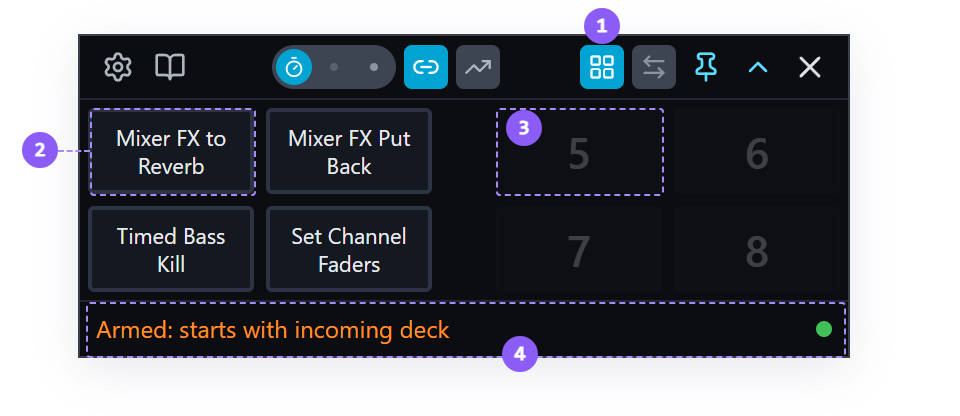
- Pad Mode icon: lit blue while Pad Mode is on.
- A filled pad: shows its action's name. Click it to fire the action.
- An empty pad: shows its slot number in large gray type and does nothing.
- Status line: stays beneath the pads.
5. Fire them
- Click pad 1. In Traktor, the outgoing channel's Mixer FX selector moves to Reverb. The pad's border flashes blue as it fires.
- Click pad 2. The selector goes back to the effect it was on before pad 1.
- Click pad 3. The low EQ knob on decks A and B turns all the way down, and two seconds later both go back to center.
- Click pad 4. The outgoing deck's channel fader goes to full and the incoming deck's to zero. Most tutorials start from that position, so this pad sets it up in one press.
While Timed Bass Kill is waiting out its two seconds, its pad shows a spinner and the other pads dim. Only one action runs at a time.
Click pad 3 again, and this time press and hold it while it runs. A red fill sweeps across the pad from left to right, and when it reaches the far edge, a bit under half a second later, the action is aborted. Release before then and nothing happens. An aborted Timed Bass Kill leaves both low EQ knobs all the way down, because its last steps never ran; turn them back to center by hand.
Empty pads are inert. Clicking one does nothing, and hovering it says why.
6. Turn Pad Mode off
Click the grid icon again. Pad Mode turns off and the picker row and progress strip come back.
Turning Pad Mode on leaves a running transition alone, and it hides the transport. While you are in Pad Mode you cannot abort, press End, or watch the progress meter. Toggle back to reach them.
Pad Mode's on/off state survives a restart, so if you quit with it on, that is how the app opens.
7. The same actions, run by a fusor
Open Session View. Wash Out's stack opens with a card for the action it runs before the transition, Mixer FX to Reverb, and closes with one for the action it runs after, Mixer FX Put Back. The two pads you just pressed are the two actions Wash Out runs before and after its transition. The next tutorial runs them.
What you learned
- That an action is a list of control changes, run when you fire it, and that a fusor can run actions just before and just after its transition.
- That a pack is eight slots, that one pack is active at a time, and that Pad Mode shows it.
- That a CAPTURE step remembers a control's position under a name, and a RESTORE step in another action can put it back.
- That a role address such as outgoing follows the deck role and needs a fusor loaded, and that an action naming decks A and B directly works with nothing loaded.
- That one action runs at a time, and that holding a running action's pad aborts it.
- That Pad Mode hides the transport while it is on.
Where to next
- Wash Out: the fusor that runs those two actions, an effect tail, and Mixed Run Mode.
- Pad Mode: the runtime reference for the grid.
- Author Your First Action: writing an action of your own, and building a pack to fire it from.
- Hardware Controller: bind pads 1 to 8 to real buttons.