Drift
The fusor is Drift. It modulates one FX unit on the outgoing deck and both channel faders. Two effects share the unit: a Filter in slot 1 that thins the outgoing track smoothly from halfway, and a Delay in slot 2 whose echo gets longer in steps. The incoming track comes in over the first half and the outgoing track goes out over the second half, taking its echoes with it.
One run. Most of this tutorial is in Session View, before the run: FX routing, stepped lanes and the step sets behind them. Session View names every position a stepped lane will reach.
Your crossfader stays in bypass.
Before you start
- Drop In done, and Start-with-Incoming switched back off. This run starts when you start it.
- Your crossfader still in bypass, where you left it.
- Tutorials still the active collection.
- Traktor, with the Fusor Studio mapping loaded and FX Unit 1 free: in group mode, with a Filter in slot 1 and a Delay in slot 2.
1. Load Drift and read the stack
Click the fusor picker and click the Drift row. Open Session View with the expand arrow.
Above the stack sits the author's intent line:
Let the outgoing track drift away: thin it out and stretch its echoes longer and longer while the incoming takes over.
Drift is filed as a Middle mix, and the glyph above the stack shows it. Attention shifts to the incoming track halfway, and the outgoing track plays out over the second half. The orange mix mark sits at 50% on the progress meter. That is where you want the incoming track's intro to end.
The stack holds two cards:
| Card | What it modulates |
|---|---|
| FX Unit | One FX unit's Dry/Wet and its three slots, on the outgoing side only. The incoming column is empty: the fusor applies no effect to the incoming deck, and uses one FX unit only. |
| Channel Fader | volume on each deck. The incoming track comes in over the first half, and the outgoing track goes out over the second. |
Session View always puts the Channel Fader last, so the FX unit card sits above it.
2. The preflight line, and the effects it names
The FX Unit card shows a line under its title:
Assign Filter to FX 1 slot 1 and Delay to slot 2.
That is a domain preflight: a line attached to one domain, saying what your rig has to look like before the run. Drift's author wrote this one. A card whose author writes none shows the default line that ships with its domain type.
The fusor modulates each slot's amount knob, and what that knob does is whatever Traktor has loaded behind it. Fusor Studio cannot load an effect into an FX unit's slot for you. Load the two the preflight names and the transition does what the intent line says. Load others and the run is identical and the sound is something else.
3. A smooth lane and a stepped lane on one card
Click the FX Unit card to expand it. The OUTGOING and INCOMING column headers appear above the body, and the incoming column is empty for the whole card.
On the outgoing side: a Dry/Wet lane at the top with a row of numbered boxes beside it, then one row per slot, three of them. Parameter names are color-coded. Blue with a small curve beside it means the fusor modulates that parameter; gray means it does not.
- Dry/Wet holds at zero for the first half, jumps to about 0.35 at halfway, and rises to fully wet by the end.
- Slot 1's amount, the Filter, holds at its center for the first half, where it does nothing. From halfway it sweeps up into high-pass, sending every value on the way.
- Slot 2's amount, the Delay's rate, steps. It sits on 1/8 until three quarters, then jumps to 1/4, 3/8 and 4/4, and sends nothing between those positions.
- Slot 3's amount is gray. All three slot switches are set: slots 1 and 2 off for the first half, on from halfway until the last tick, and slot 3 held off for the whole run.
That last point is a rule: a fusor owns the whole FX unit it routes through and switches off every slot it does not modulate when the transition starts. An effect you had running in slot 3 of that unit stops. Give the fusor a unit you are not using yourself. FX Routing has the reasoning.
4. The computed line
Between the card's title row and its preflight line sits one more line:
FX1 Slot 2 Amount: 1/8 → 1/4 → 3/8 → 4/4
That is a computed line. Fusor Studio computes it from the fusor's own curves every time the card is drawn, and it cannot be edited. Read it left to right: FX1 is the unit, Slot 2 is the slot, and Amount is the parameter, which on a Delay in group mode is its RATE knob. Then the positions the lane reaches, in the order it reaches them.
Only the stepped lane gets a line. A stepped lane has a fixed list of named positions with nothing meaningful between them, so Session View can name every one before the run. Slot 1's lane sweeps and has no positions to name, so it gets none, and neither does Dry/Wet.
The list behind slot 2's lane is a step set called Delay Rate (7), and it holds seven
positions: 1/32, 1/16, 1/8, 3/16, 1/4, 3/8 and 4/4. The line names four of them,
because those are the four this fusor reaches.
The line is there so you can check, before the run, that the effect you loaded matches the steps the fusor will send. A step set spaces its positions evenly across the control's full range, so each position sends a value worked out from how many positions the set holds. Those values select the settings the line names only when the control in your DJ app has the same settings in the same order. Traktor's Delay has seven RATE settings, short at the bottom of the knob and long at the top, which matches Delay Rate (7). Delay T3 and Ramp Delay have the same seven settings in the reverse order, so a fusor written for one of them uses Delay T3 Rate (7) instead. Load a Delay T3 into slot 2 here and every step selects a different echo length from the one the line names.
What the line says in other cases is in Loading a fusor → What the card says it will send.
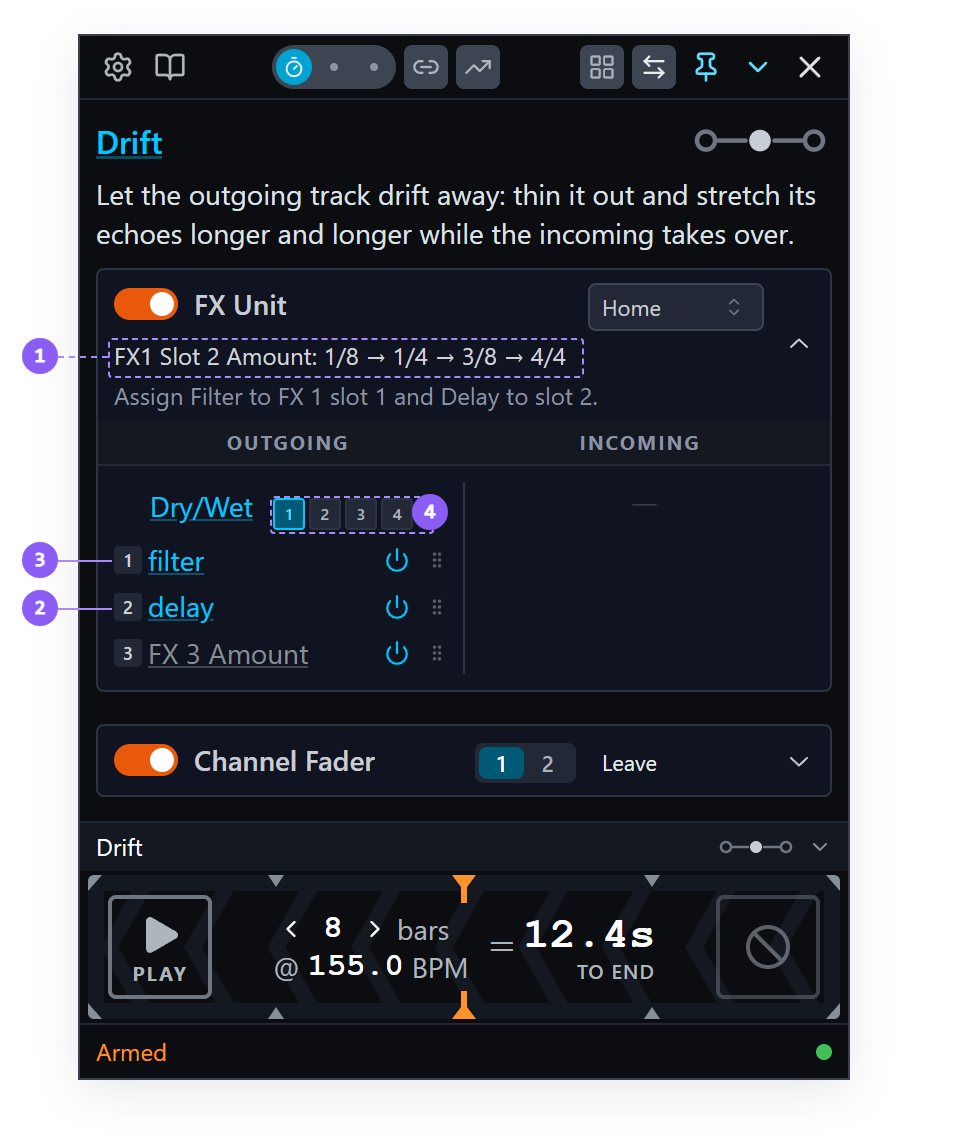
- Computed line: the positions slot 2's lane reaches, in the order it reaches them.
- Slot 2's lane: the Delay's rate. It steps, so it gets the computed line.
- Slot 1's lane: the Filter. It sweeps, so it has no line.
- FX-unit picker: unit 1 is selected.
5. Prepare your decks
In your DJ application, on the deck pair you chose during setup:
- Load two tracks that blend. Drift works on most material. On the outgoing track, run the transition over a section where an echo sits well, such as a breakdown or a vocal phrase. The incoming track wants an intro of about half of the transition's length, ending where the incoming track takes over.
- Set your channel faders. The outgoing deck's at full and the incoming deck's at zero, which is where the two curves begin.
- Leave the crossfader hard over to the outgoing side. It is in bypass, so it modulates nothing, and it is still the progress actuator.
- Get FX Unit 1 onto the outgoing deck. With Auto-assign FX units to decks (Traktor, Mixxx) on in Settings → Guards, the Fusor player does it when the transition starts. With it off, assign the unit in Traktor before you start the run. If unit 1 is busy on your rig, click another number in the row of boxes beside the card's Dry/Wet lane: that moves the whole domain to that unit, as a session edit, until the run begins.
- Start the outgoing deck playing.
The full lifecycle is in Arming and Running.
6. Run it
Put the Run Mode switch on Auto. Set the length to a duration that matches how you want to mix the two tracks, and the tempo to the tempo you are mixing at. Start the incoming deck so the end of its intro meets the transition's Middle mix point, at the orange mark, and press PLAY as it starts. You can also run it by hand: the marks in the table below are points on the progress meter, and the quarter marks show you where they are.
If you are unsure what we mean by starting the incoming deck so it meets the mix point, see Starting a Transition for examples.
For the first half of the run the outgoing track plays clean and the incoming fader comes up underneath it, so the two tracks are level at halfway. The FX unit builds over the second half:
| From | Slot 2's rate | Filter and Dry/Wet | Channel faders |
|---|---|---|---|
| 50% | 1/8 | Both slots switch on. Dry/Wet jumps to about 0.35 and rises quickly; the Filter starts to thin the track. | Both tracks level. |
| 75% | 1/4 | Dry/Wet nearly fully wet; the Filter keeps rising. | Outgoing coming down. |
| 87.5% | 3/8 | Fully wet. | Outgoing well down. |
| About 94% | 4/4, held to the last tick | Fully wet. | Outgoing nearly out. |
On the last tick the outgoing fader reaches zero and both slot switches go off.
Press END at completion.
7. A Middle mix: the effect builds, and the fader takes it out
Drift's effect has no tail. The run is over at 100%, and by then the outgoing fader has already taken the echoes down to nothing. Drift's FX unit is authored as Insert: the effect sits in the channel, before the fader, so the fader turns the echoes down along with the track. On Drift the effect builds over the second half, and the fader takes it out with the track.
An effect that rings on after the run ends is an Effect tail, and it needs an End mix point. Wash Out does this with a reverb.
8. Home, at the end of the run
Look at the End of run dropdown in the FX Unit card's title row. It reads Home.
On EQ Swap the 3-Band EQ card read Restore. On Channel Fader, EQ Swap and Drop In the Channel Fader card read Leave. Home is the third of the three. Drift's Channel Fader card still reads Leave. All three act on the outgoing deck:
- Leave: the outgoing controls stay where the curves left them. Nothing is sent.
- Restore: they go back where you had them before the run. It needs a baseline recorded before the run.
- Home: they go to the control's neutral position. It needs no baseline, so it works with Snapshot / Restore off.
FX units ship on Home, channel faders on Leave, and every other domain on Restore. FX Unit ships on Home, so the outgoing deck is left dry after the transition without needing a baseline.
So pressing END sent the FX unit's modulated parameters to neutral, Dry/Wet back to dry among them, and the status line said so:
Controls sent home (6)
It sends only what the fusor modulated. Slot 3's amount is not on that list, because Drift does not modulate it.
The baseline Restore needs is recorded by Snapshot / Restore, in Settings → Guards → Transition Behavior. Switch that off and Restore has nothing to put back, so the controls stay where the curves left them, with no error and no status message. Home and Leave work as before.
The End of run dropdown is a session edit like the others on the card. The three settings in full, and which domains ship on which, are in Domains → End of run.
What you learned
- That Drift is a Middle mix: attention shifts to the incoming track halfway, and the mix mark sits at 50% on the meter.
- That the Auto-assign FX units to decks (Traktor, Mixxx) guard assigns the unit when a transition starts.
- That the domain preflight names the effects to load, and that Fusor Studio cannot load them for you.
- That a fusor owns the whole FX unit it routes through and switches off the slots it is not modulating.
- That a continuous lane sends every value on the way, and a stepped lane jumps between named positions from a step set, here Delay Rate (7).
- That a stepped lane puts a computed line on its card naming the positions it reaches, in order, before the run, so you can check that the loaded effect has the settings it will send in the same order, and that sweeping lanes and switches get none.
- That on Drift the effect builds over the second half and the fader takes it out with the track, inside the run, and that an effect ringing on after the run is an Effect tail, which needs an End mix point.
- That Home sends the controls the fusor modulated to their own neutral positions and needs nothing recorded, and that Restore depends on Snapshot / Restore.
Where to next
- Actions and Pad Mode: what an action is, and the Tutorials pack fired from the pads, ahead of a fusor that runs actions of its own.
- FX Routing: auto-assignment, what it snapshots, when to leave it off, Insert and Post Fader, and the authoring rules behind a fusor owning a whole unit.
- Stepped Output: step sets in full, and editing steps on the canvas.
- Domains → End of run: the three settings, which domain ships on which, and what a disabled domain does at the end of a run.
- Settings → Guards: Auto-assign FX units and Snapshot / Restore, and exactly what each one governs.