Mix Points
A mix point is where the listener's attention shifts from the outgoing track to the incoming track. A fusor records one, as Start, Middle or End, and it can also leave it unset. The cues on the tracks themselves are the incoming track's mix-in point and the outgoing track's mix-out point.
It describes the shape of the mix the fusor was built for. The Fusors list shows it as a column, so you can read that shape before you load anything, and Session View shows it as a glyph above the domain stack.
Reading the diagrams
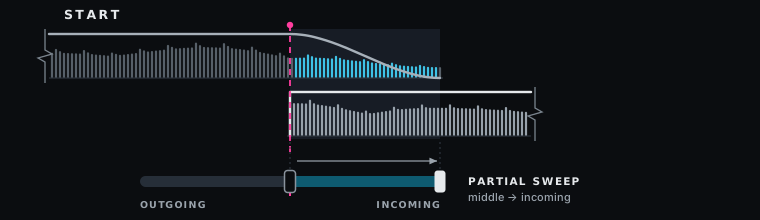
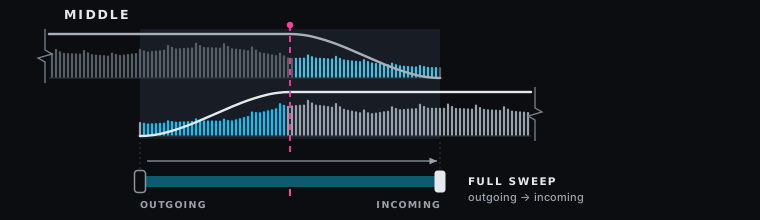
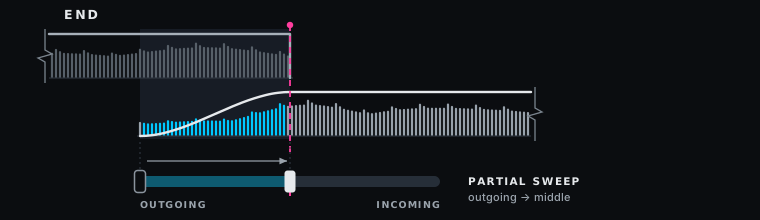
The figures below are drawn the same way.
| In the figure | What it shows |
|---|---|
| Dim waveform | The outgoing track, as recorded. |
| Bright waveform | The incoming track, as recorded. |
| Cyan waveform | The part of a track that is fading, in or out. |
| Pale line above a waveform | That deck's level across the transition. |
| Pink dashed line | The mix point. |
| Bar along the bottom | Deck level as a function of progress, drawn as a crossfader sweep. |
The sweep is a picture of level, not of travel. During a run the crossfader is the Fusor player's progress actuator and crosses its full width every time, whichever mix point the fusor records.
The three values
Start
The incoming track enters at full level, and the rest of the transition fades the outgoing track out.
Middle
Attention shifts around halfway. Both tracks play on past that point, and the outgoing track plays out. This is the shape a long overlap gives you, and it is what the Middle Channel Fader is authored for.
End
Attention shifts as the transition ends. The outgoing track ends with the transition, for example with an echo out or a cut.
When to use each
| Mix point | Where attention shifts | Use it for | Library fusors |
|---|---|---|---|
| Start | The incoming track enters at full level. | Incoming tracks with no intro, drops. Suits Start-with-Incoming. | Channel Fader (Start), Drop In |
| Middle | Halfway, over a long overlap. | EQ swaps, blends, and an effect that builds or fades out over the second half. | Channel Fader (Middle), EQ Swap, Vocal Sustain, Drift |
| End | As the transition ends. The outgoing track stops with it. | An echo out or a cut, and an effect that rings out after End (Effect tail). | Channel Fader (End), Wash Out, Echo Out |
On an End fusor without an effect tail the run is over at 100%, so an effect still wet at that moment rings on unshaped (Leave) or is cut off when its controls are sent back (Restore, Home). To leave room after End for an outgoing effect to taper off, turn on Effect tail on its domain, as Wash Out and Echo Out do. The bars you set are the length of the run to End, and the tail is added after it. In Auto, the clock plays the tail out over a further 25% of the transition's length. To control when the tail tapers off, run the fusor in Mixed, where your crossfader plays the tail out. See A run with an effect tail. To fade an effect out inside the run instead, file the fusor as Middle and author the fade-out into the second half. The authoring side is in FX Routing.
What the Fusor player does with it
In Auto and Manual Run Mode the mix point times nothing. The run plays the same whatever the value, and the meter's 100% is the end of the transition. The exception is End on a fusor with an effect tail, where the tail runs after End in every Run Mode and the player rescales the strip to make room for it.
Mixed Run Mode reads it. A Mixed run is driven by the clock up to the mix point and stops there: Middle at 50%, and at End on a fusor with an effect tail, before the tail. Start, and End without a tail, leave a Mixed run nowhere to stop, so Mixed is available only for a fusor filed as Middle, or as End with an effect tail, and only with a license. See Wash Out, whose first run is a Mixed run that stops at End.
The progress meter draws the fusor's mix point as the orange mix mark at 50% for Middle, at 80% of the way along the strip for End on a fusor with an effect tail, and on the meter's edge for Start or End without a tail. The small gray quarter marks (on by default) sit at the start, a quarter, half, three quarters and the end of the run to End, and are a guide when you move the crossfader by hand. On a fusor with an effect tail that is the first 80% of the strip. A fusor with no mix point has no orange mark. See The mix mark and quarter marks.
The mix mark gives you a strong reference point during a Manual run, or the Manual half of a Mixed run. Bring the progress meter to the mark as the incoming track reaches the point the fusor was built for, and your fusor's progress stays aligned with your track's.
An early or late handover
Hand over earlier or later than halfway with a bar count on a Middle fusor in Mixed. The run plays on the clock to the mix point, stops, and you finish by hand for as long as you like. The bar count times only the automatic part, which ends at half of the bars you set.
| Handover | Load | Set in Mixed | The run stops at | You finish by hand |
|---|---|---|---|---|
| A quarter of an 8-bar transition | A Middle fusor | 4 bars | Bar 2 | The next 6 bars |
| Three quarters of an 8-bar transition | A Middle fusor | 12 bars | Bar 6 | The last 2 bars |
Changing a fusor's mix point changes nothing else in the fusor. Its curves stay as authored.
Setting it
Mix Point is on the Info tab of a fusor's detail view, beside Author and Version. It is a picker, and it commits the moment you change the selection. See Authoring Overview.
In the Fusors list it renders as a rail with three positions: start, middle and end. The authored position is a solid dot, the largest on the rail. The other two are hollow. A fusor with no mix point shows nothing there. Choose Mix Point in the list's Sort control to group start, middle and end, with unset ones last.
Where to next
- Channel Fader: a Start, a Middle and an End fusor run by hand, one after another, as three fade shapes.
- Drop In: a Start mix point, started by the incoming deck.
- Drift: a Middle mix point, with an FX unit that builds over the second half while the outgoing fader takes it out.
- Wash Out: an End mix point with an Effect tail, and a reverb that rings out and fades after End, run again in Mixed.
- Vocal Sustain: a Middle fusor run by hand with two holds, then in Mixed.
- Authoring Overview: the Info tab, and every other field a fusor records.